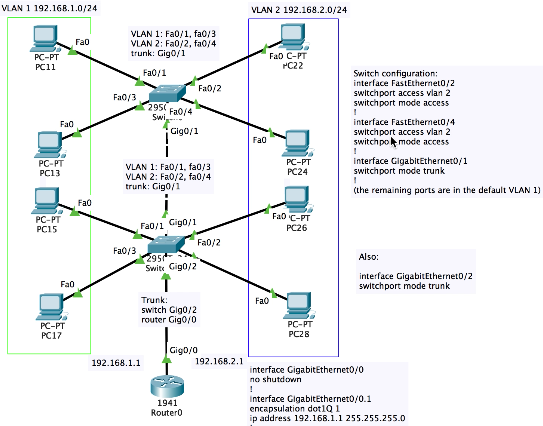
Two virtual LAN of PCs (192.168.1.0/24 and 192.168.2.0/24) with switch ports assigned to each VLAN, interconnected with each other and a router using trunk mode, with packets that belong to both VLANs encapsulated in the standard dot1Q format.
PacketTracer file
with configured PCs:

interface FastEthernet0/2
switchport access vlan 2
switchport mode access
!
interface FastEthernet0/4
switchport access vlan 2
switchport mode access
!
interface GigabitEthernet0/1
switchport mode trunk
!
interface GigabitEthernet0/2
switchport mode trunk
interface GigabitEthernet0/0
no shutdown
!
interface GigabitEthernet0/0.1
encapsulation dot1Q 1
ip address 192.168.1.1 255.255.255.0
!
interface GigabitEthernet0/0.2
encapsulation dot1Q 2
ip address 192.168.2.1 255.255.255.0
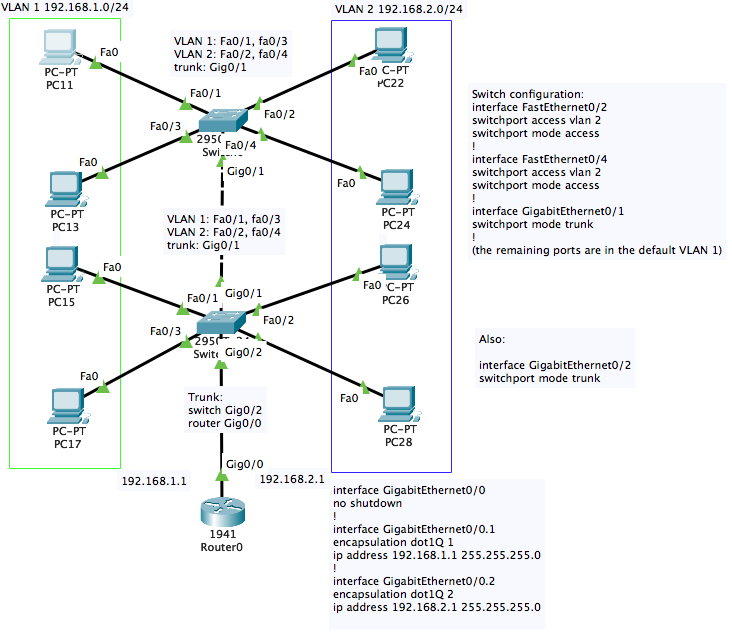
PacketTracer file,
all configured:
The devices are all
configured. Check show running-config in any to see the setup. In the switches you can see the allocation of ports to VLANs with show vlan. In the
router, the Gigabit Ethernet cable can be unplugged by int gig0/0
followed by shutdown and reactivated by no shutdown.